The Hidden Reason Why Your Maps Sometimes Appear in the Wrong Place
Have you ever opened a map in GIS software and suddenly:
- roads appear in the middle of the ocean,
- buildings shift hundreds of kilometers away,
- or layers refuse to overlap correctly?
At first, it feels like the data is broken. But in many cases, the real problem is something much simpler:
the Coordinate Reference System (CRS).
CRS is one of the most important — and most misunderstood — concepts in GIS. And surprisingly, many spatial analysis errors begin with a wrong CRS.
What Exactly Is CRS?
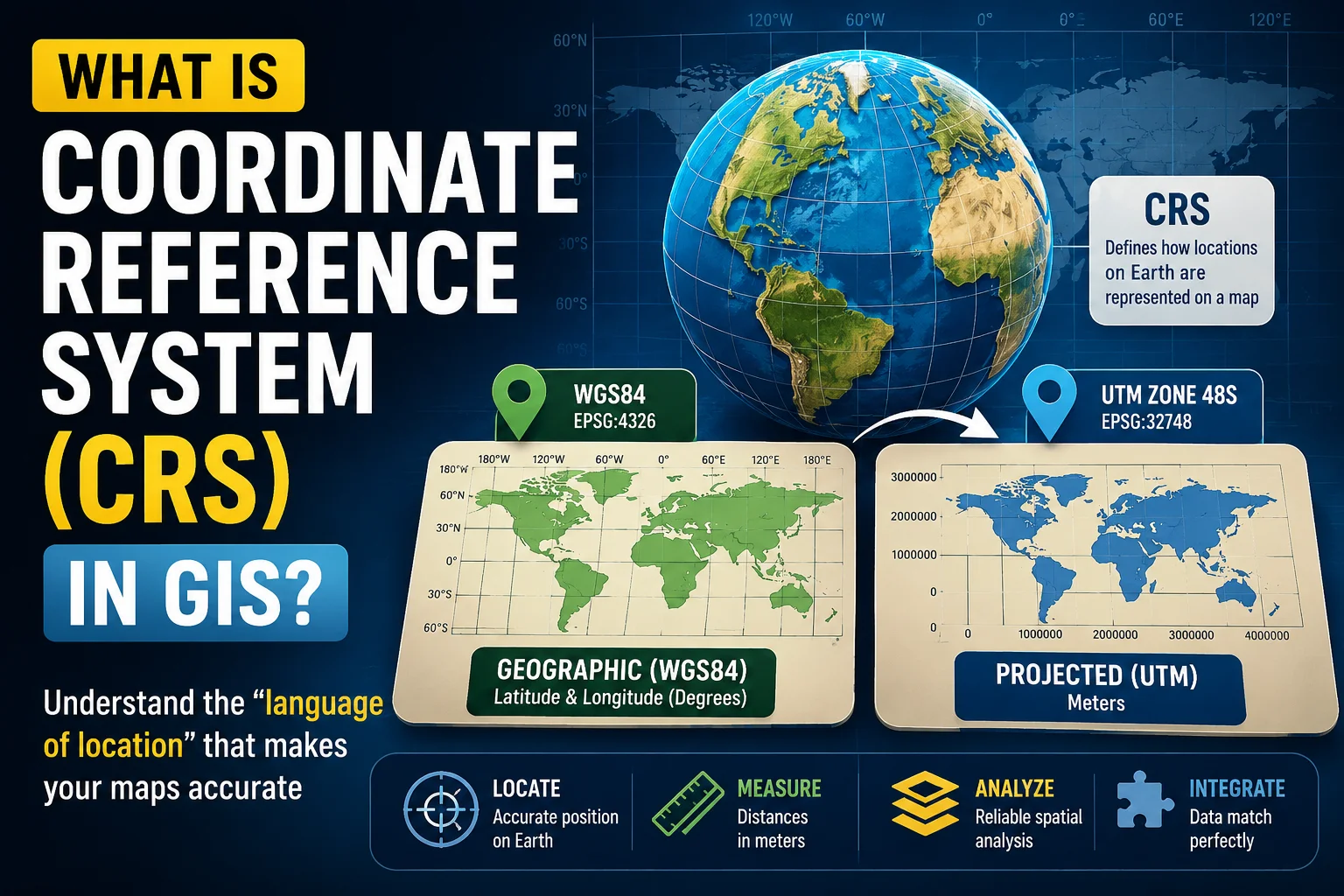
A Coordinate Reference System (CRS) is a framework that tells GIS software:
- where spatial data is located on Earth,
- how coordinates should be interpreted,
- and how the curved Earth is transformed into a flat map.
In simple terms:
CRS is the “language of location” used by spatial data.
Without CRS, GIS software sees coordinates as meaningless numbers.
Why GIS Needs CRS
The Earth is not flat. It is approximately shaped like a slightly flattened sphere called an ellipsoid. But maps on computer screens are flat. This creates a huge challenge:
How do we represent a curved Earth on a flat surface?
The answer is:
map projection and coordinate systems.
CRS provides the mathematical rules for doing this transformation.
Imagine Trying to Draw the Earth on Paper
Think about peeling an orange and trying to flatten the peel perfectly onto a table. Impossible, right? The peel stretches, tears, or bends. The same thing happens when mapping Earth.
Every map projection introduces some distortion:
- area,
- shape,
- distance,
- or direction.
That is why different CRS exist for different purposes.
The Two Main Types of CRS
1. Geographic Coordinate System (GCS)
This system uses:
- latitude,
- and longitude.
Coordinates are measured in degrees. Example: (−6.2∘, 106.8∘)
This is the type of coordinate system used by:
- GPS,
- Google Maps,
- smartphones,
- and many global datasets.
The most famous example is: WGS84 (EPSG:4326)
If you use GPS, you are almost certainly using WGS84.
2. Projected Coordinate System (PCS)
Projected systems transform the curved Earth into a flat surface. Instead of degrees, coordinates use:
- meters,
- feet,
- or other linear units.
This makes projected systems much better for:
- measuring distances,
- calculating areas,
- engineering,
- urban planning,
- and spatial statistics.
Why This Matters More Than You Think
Suppose you want to calculate:
- the distance between schools,
- flood area size,
- or housing accessibility.
If your CRS is wrong, your measurements may also be wrong. Imagine measuring city distances using degrees instead of meters. The results can become meaningless.
The Most Common GIS Beginner Mistake
One of the most common GIS problems happens when:
- one dataset uses WGS84,
- another uses UTM,
- and users combine them without reprojection.
The result? Layers appear:
- shifted,
- stretched,
- rotated,
- or completely misplaced.
This often causes panic among beginners. But usually the data is fine. The CRS is the problem.
WGS84 vs UTM
These are two CRS you will encounter constantly.
| CRS | Uses |
|---|---|
| WGS84 | Global mapping & GPS |
| UTM | Accurate local measurements |
WGS84
Uses:
- latitude,
- longitude,
- decimal degrees.
Great for:
- navigation,
- web maps,
- and global visualization.
But not ideal for precise distance calculations.
UTM (Universal Transverse Mercator)
Divides Earth into zones. Coordinates are measured in meters. Excellent for:
- local analysis,
- engineering,
- spatial statistics,
- and distance-based modeling.
The Difference Between “Define CRS” and “Reproject”
These two concepts confuse many GIS users.
Define CRS
Used when:
- the dataset already has coordinates,
- but CRS information is missing.
You are simply telling GIS:
“This data uses this coordinate system.”
No coordinates are changed.
Reproject CRS
Used when:
- converting data from one CRS into another.
Example:
- WGS84 → UTM.
This process mathematically changes coordinate values.
What Are EPSG Codes?
CRS are usually identified using EPSG codes. Examples:
| CRS | EPSG Code |
|---|---|
| WGS84 | 4326 |
| UTM Zone 48S | 32748 |
These codes help GIS software recognize coordinate systems consistently.
CRS in R
If you work with spatial data in R, CRS becomes extremely important. Packages such as:
- sf,
- terra,
- and sp
all rely heavily on CRS information.
Example:
library(sf)st_crs(mydata)
Transforming CRS:
st_transform(mydata, 32748)
Why CRS Is Critical in Spatial Statistics
Spatial statistics depend heavily on distance calculations. Methods such as:
- Moran’s I,
- spatial regression,
- kriging,
- hotspot analysis,
- and Geographically Weighted Regression (GWR)
all require accurate spatial distances.
If CRS is incorrect:
- neighborhoods may appear wrong,
- distances become distorted,
- and statistical conclusions can become misleading.
A Hidden Foundation of GIS
CRS may seem technical at first. But in reality, it is one of the hidden foundations behind:
- digital maps,
- GPS systems,
- navigation apps,
- remote sensing,
- urban analysis,
- and spatial modeling.
Almost every spatial analysis begins with CRS. And surprisingly, many GIS problems disappear once CRS is handled correctly.
Conclusion
A Coordinate Reference System (CRS) is the mathematical framework that connects map coordinates to real-world locations on Earth.
It determines:
- how spatial data is positioned,
- how maps are projected,
- and how distances and areas are measured.
Without CRS:
- maps cannot align properly,
- spatial analysis becomes unreliable,
- and GIS loses its geographic meaning.
So the next time your map appears in the wrong place…the first thing to check may not be the data itself…
but the Coordinate Reference System behind it.